The Ultimate Registered Training Organisation Website Checklist
Your website is often the first place students, employers, and regulators form an opinion about your RTO—so if it’s unclear, outdated, or missing key information, you can lose enrolments (and invite compliance headaches) fast. That’s where a practical RTO Website Checklist becomes essential. In this ultimate guide, you’ll get a clear, step-by-step checklist to help you build or improve an RTO website that looks professional, supports conversions, and aligns with what the VET sector expects. Whether you’re launching a new site or fixing gaps on an existing one, this checklist will help you tighten your content, boost trust, and turn more visitors into enquiries.
A well-designed website can help us to achieve several goals, including:
- Attracting new students through the website is the first interaction of students with the RTO
- Promoting their courses and services
- Building trust and credibility with potential students and employers
- Providing a convenient and easy way for students to manage their studies
- Demonstrating their commitment to quality education and training
- Making it easy for students to find the information they need to enrol in courses
So, it is important for RTOs to know what to include on their website.
The Registered Training Organisation RTO Website Checklist
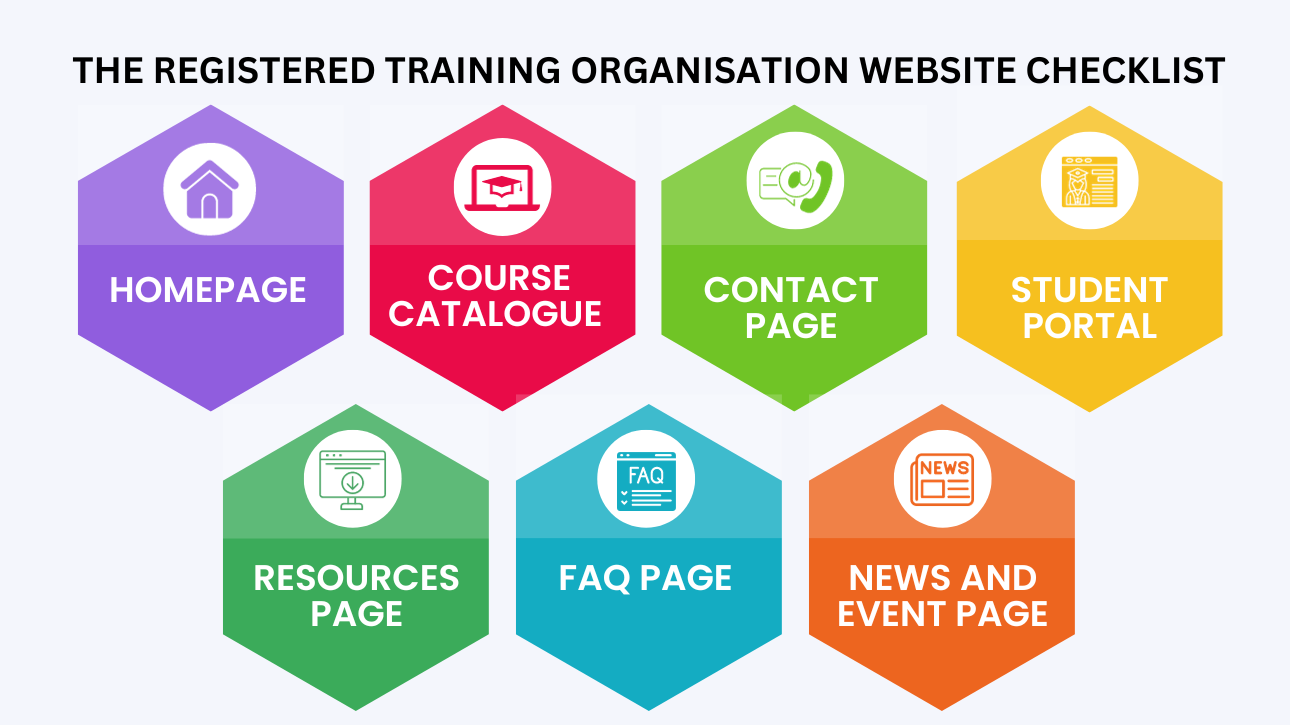
Homepage
Your homepage is the most important page on your website, as it is the first page that most visitors will see. Make sure that your homepage includes the following elements:
- Clear and concise description of your RTO and the courses and services you offer.
- A strong call to action, such as a button that visitors can click to learn more about your courses and enrol. You can also add a ‘Call Us’ button, a WhatsApp chat button, or a chatbot that will help answer basic questions from potential students.
- Links to important pages on your website, such as the course catalogue, contact page and student portal.
- Information that is consistent with your RTO’s branding and that reflects your commitment to quality education and training.
Course Catalogue
Your course catalogue should provide detailed information about all of the courses that you offer. This information should include:
- Course name and description
- Eligibility requirements
- Duration and delivery mode
- Cost and fees
- Assessment methods
- Career outcomes
- Clear and concise information about the benefits of each course and the skills and knowledge that students will gain.
Contact Page
Your contact page should make it easy for visitors to get in touch with you. Could you include your phone number, email address and meeting address? You may also want to embed a Google Map showing your location to make it easier for the students to visit. You may also want to include a contact form so that visitors can easily send you a message.
Student Portal
A student portal can provide your students with a convenient and easy way to manage their studies. This portal can include features such as:
- Access to course materials and resources
- Online enrolment and payment
- Student progress tracking
- Communication with trainers and other students
- Features that support student learning and engagement
Other important pages that you can include, which will make your website attractive and easy to use, are:
Resources Page
This page can provide students and other visitors with access to helpful resources, such as links to government websites and industry associations relevant to the courses that you offer. You can also provide free learning resources that will help your students.
FAQ Page
This page can answer all the most common questions that you are students and potential students may have about RTO and training in Australia. Make sure to include common questions about the courses and services you offer as well.
News and Event Page
This page can be used to share important news and announcements about your RTO as well as upcoming events.
Design and Usability for RTO Website Checklist
When designing your website, it is important to keep the following in mind
- Use a professional and modern design that is consistent with your RTO’s branding.
- Make sure that your website is easy to navigate and that students can easily find the information they are looking for:
- Use clear and simple language.
- Make sure that your website is mobile-friendly.
- Use a responsive design to ensure that your website.
Now, let’s look at a few RTO websites that are great examples of good website design.
TAFE NSW
The TAFE NSW Website has a clean and modern design that is easy to navigate. The website uses a lot of white space, which makes it easy to read the text and find the information needed. The website also uses high-quality images and videos to showcase the RTO’s courses and facilities.
Holmes Glen
The Homes Glen website has a bright and colourful design that is visually appealing. The website uses a variety of false textures to create a unique and engaging experience for the students and visitors. The website also uses a lot of animation to make the content more dynamic and engaging.
Box Hill Institute
The Box Hill Institute Website has a minimalist design that is focused on functionality. The website uses a lot of white space and a simple navigation menu to make it easier for visitors to find the information they need. The website also uses high-quality images and videos to showcase the RTO’s courses and facilities.
Melbourne Polytechnic
The Melbourne Polytechnic website has a professional and modern design that is easy to navigate. The website uses various fonts and textures for an engaging experience for students and visitors. Also uses animation to make the content more dynamic and engaging.
So, what do we learn from these great examples? We learn that a well-designed easy to navigate and mobile-friendly website is a good website. Moreover, using high-quality images and videos to showcase services, offers and courses is the right move for any RTO.
Going the extra mile for the RTO website
In addition to the information about we are going to share something a little extra that will help you to stand out from the competition:
- Include testimonials from past students: This is a great way to build trust and creativity with potential students.
- Make sure that your RTO website is regularly updated with new content: This will help to keep your website fresh and engaging and will also help to improve your SEO.
- Promote your RTO website on social media and other online channels: This will help to reach a wider audience and attract more visitors to your website.
Bonus tip
Use a content management system (CMS) to create and manage your website content. WordPress is one of the most common and freely available CMS. But choosing the right CMS depends on your specific needs and requirements.
Conclusion
Remember, your website is one of the most important marketing tools for your RTO. You must have a registered training organisation RTO website checklist to avoid mistakes. This checklist and the tips given in the blog will surely help you and your website to achieve your business goals. You can also share this checklist with your team of experts. By creating a well-designed website, you can position your RTO as a leader in the industry and attract more students.
Are you an RTO looking for quality training resources? VET Resources is your partner. We offer free consultation to RTOs. We also have a YouTube channel with videos explaining RTO and its operations in great detail. For further information, contact us here.
Frequently Asked Questions (FAQs)
1) What is an RTO Website Checklist and why does it matter?
It’s a structured list of must-have pages, compliance details, and UX/SEO essentials that help your RTO website build trust and generate enquiries.
2) What key pages must every RTO website include?
Core pages include Home, About, Courses/Qualifications, Enquire/Contact, Policies, Student Info, Fees/Refunds, and Complaints/Appeals.
3) What compliance-related information should appear on an RTO website?
Your RTO details, course information, entry requirements, fees, policies, consumer info, and clear student support and complaint pathways should be easy to find.
4) How can an RTO Website Checklist improve conversions?
It helps you tighten messaging, add clear CTAs, improve course page structure, reduce confusion, and make enquiry actions simple on every page.
5) What common website mistakes hurt enrolments?
Outdated course info, unclear pricing, broken forms, slow load speed, missing policies, weak CTAs, and confusing navigation.
6) How often should an RTO update its website?
Review key pages monthly and update immediately when training products, fees, policies, or delivery details change.
7) What SEO basics should be included in an RTO Website Checklist?
Keyword-led page titles, meta descriptions, clean URLs, headings (H1–H3), internal links, fast speed, mobile-friendly design, and schema where relevant.
8) How do I make course pages easier for students to understand?
Use clear outcomes, delivery mode, duration, units, entry requirements, fees, locations, intakes, and a strong “Enquire Now” CTA.
Disclaimer:
The information presented on the VET Resources blog is for general guidance only. While we strive for accuracy, we cannot guarantee the completeness or timeliness of the information. VET Resources is not responsible for any errors or omissions, or for the results obtained from the use of this information. Always consult a professional for advice tailored to your circumstances.